
Code Escaping Algorithm

⌘K
  1. Home
  2. Docs
  3. Translator++
  4. Code Escaping Algorithm

Code Escaping Algorithm

The Code Escaping Algorithm ensures that any code embedded within translatable text remains unchanged (escaped) after being processed by machine translators.

In your game, the text likely contains not only dialogue or descriptions but also scripts, variables, tags, and other embedded elements.

The general practice is you want to translate the texts, and leave the scripts and tags alone. Why, you might ask? Well … a slight change on those tags will cause a nuclear warfare. And every extra space on the tags a cat will be killed.

The problem is that machine translators are not smart enough to distinguish between translatable text and code. They will blindly translate anything they see, whether it’s actual text or a tag.

To make it easier to understand, take a look at the figure below :

Escaping tags

Depend on the translator engine, there is several algorithm currently available
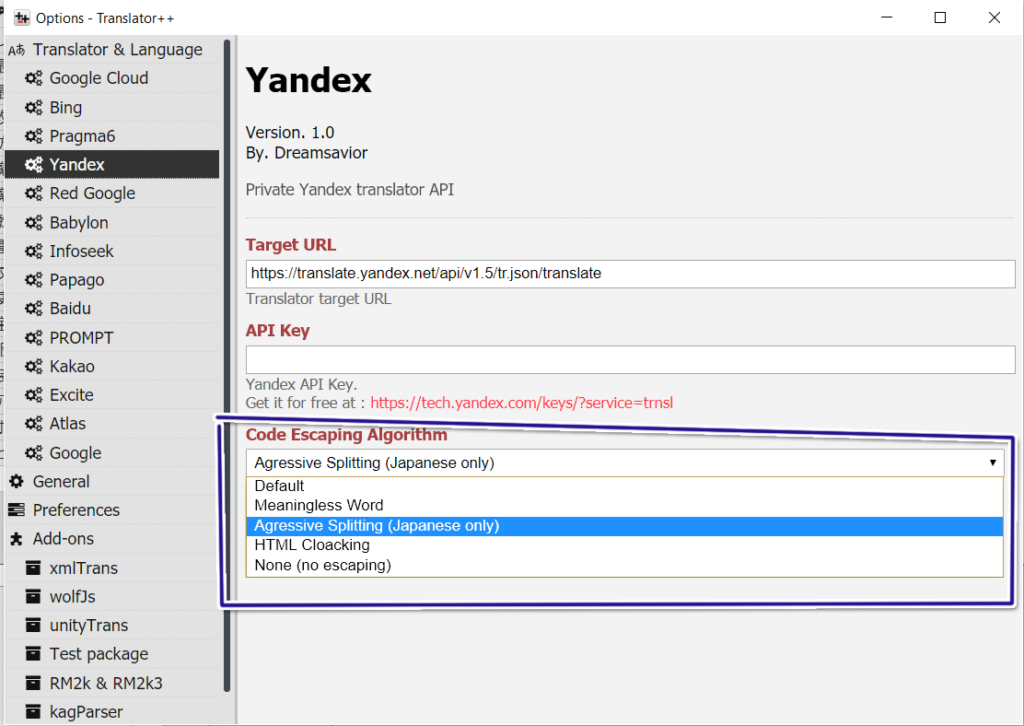
Code Escaping Algorithm available on Yandex Engine

Why this exists:

  • Most translators (especially LLMs) may translate or reformat tags like \\C[1]\\V[10]%1, etc.
  • Masking replaces those parts with placeholders that translators are less likely to touch.
  • After translation, placeholders are converted back to the original tags.

Where it plugs in:

  • Each TranslatorEngine selects an algorithm via engine.escapeAlgorithm.
  • The pipeline calls CodeEscape.escapeTexts(...) (or the algorithm’s override), then sends codeEscape.getFilteredText() / codeEscape.toTranslate to the translator.
  • After a response is received, codeEscape.afterTranslation(...) restores placeholders.

Notes:

  • If the engine option disableCustomEscape is enabled, masking is skipped and the raw text is sent.
  • The examples below show masking examples and payload examples. Individual translator engines may still wrap/concat payloads differently, but the escape algorithm output is the important part.
Information

You can define the pattern of the code that should be masked yourself.

Follow Custom Escaping patterns tutorial on how to do that.

Type of Escape Algorithm

Warning

These algorithm is not fool proof.

Your beloved machine translators will always find a way to mess your code up. It is guaranteed!

Meaningless Word

This algorithm will replace all the known tags into meaningless words that can not be found in the dictionary in hopes that the machines will leave them alone.

Pros :

The translation results are good. The context in one sentence is preserved.

Const :

This is not a fool proof, because sometimes the machine will find their way to mess these words by adding extra spaces. 

When that happens, you will find a random gibberish text in the translation results. (Something like Qxyawhhj)

Aggressive Splitting

This algorithm will store all known tags into memory and will omit it from being sent to the machine.

This algorithm is almost guaranteed that the escaped tags will be preserved…. With one serious problem … the translated word loses their context in the sentence. It’s almost like word by word translation. In short, this algorithm will produce less messed up code but with a bad translation.

hexPlaceholder (default)

Brief

  • Masks matched tokens into compact 7 byte hex placeholders like 0xF0000.
  • Restoration searches for /0[xX][fF][\dA-Fa-f]{4}/g and swaps them back.
  • This is the core/default algorithm (implemented by CodeEscape itself).

Before masking

Hello \\C[1]World\\C[0]! Gold: %1

After masking

Hello 0xF0000World0xF0001! Gold: 0xF0002

Sent translation payload (typical)

Hello 0xF0000World0xF0001! Gold: 0xF0002

Expected received translation payload

Halo 0xF0000Dunia0xF0001! Emas: 0xF0002

hexPlaceholderInsensitive

Brief

  • Same as hexPlaceholder, but restoration is case-tolerant.
  • It restores placeholders matching /0x[Ff][\dA-F]{4}/g.

Before masking

Hello \\C[1]World\\C[0]!

After masking

Hello 0xF0000World0xF0001!

Sent translation payload

Hello 0xF0000World0xF0001!

Expected received translation payload

Bonjour 0xf0000Monde0xf0001!

none (NoEscapeHandler)

Brief

  • Disables masking entirely.
  • Still applies newline substitution (engine.lineSubstitute) for row-by-row / array handling.

Before masking

Line 1
Line 2

After masking

Line 1§Line 2

(Here § is the default engine.lineSubstitute; your engine may configure a different character.)

Sent translation payload

Line 1§Line 2

Expected received translation payload

Ligne 1§Ligne 2

HTMLCloaking (and alias htmlCloaking)

Brief

  • Masks matched tokens into HTML separators like <hr id="1">.
  • Restoration scans for <hr id="(\d+)"> and replaces back.
  • Useful when translators are likely to preserve HTML tags better than custom tokens.

Before masking

Hello \\C[1]World\\C[0]! Gold: %1

After masking

Hello <hr id="1">World<hr id="2">! Gold: <hr id="3">

Sent translation payload

Hello <hr id="1">World<hr id="2">! Gold: <hr id="3">

Expected received translation payload

Halo <hr id="1">Dunia<hr id="2">! Emas: <hr id="3">

HTMLCloakingInsensitive

Brief

  • Same idea as HTMLCloaking, but tries to restore even if the translator changes casing/spacing.
  • The restore pattern is lenient and intended to match variants like <HR id="1"><hr id = "1">, etc.

Before masking

Hello \\C[1]World\\C[0]!

After masking

Hello <hr id="1">World<hr id="2">!

Sent translation payload

Hello <hr id="1">World<hr id="2">!

Expected received translation payload

Bonjour <HR id = "1">Monde<HR id = "2">!

XMLCloaking (and alias xmlCloaking)

Brief

  • Same as HTMLCloaking, but uses XML-style self-closing tags: <hr id="1" />.
  • Intended for translators or pipelines that prefer well-formed XML.

Before masking

Hello \\C[1]World\\C[0]!

After masking

Hello <hr id="1" />World<hr id="2" />!

Sent translation payload

Hello <hr id="1" />World<hr id="2" />!

Expected received translation payload

Hola <hr id="1" />Mundo<hr id="2" />!

SubstituteNumber

Brief

  • Replaces matched tokens with a numeric placeholder like 9xxxxx9 (digits wrapped by 9).
  • This is designed for situations where translators frequently corrupt numbers.
  • After translation it:
    • Restores known placeholders.
    • Attempts to “repair” broken placeholders.
    • Removes unexpected numbers that were not present in the original (best-effort cleanup).

Before masking

Gold: %1 / HP: 1200

After masking (example)

Gold: 9012349 / HP: 9076549

(Exact placeholders are random per request.)

Sent translation payload

Gold: 9012349 / HP: 9076549

Expected received translation payload

Oro: 9012349 / PV: 9076549

JSTemplateCloaking

Brief

  • Masks tokens as ${dat[n]} (JavaScript template placeholders).
  • Sends the request as a JavaScript array literal using template literals (backticks).
  • Restores by running eval(...) with dat bound to the placeholder map.

This is primarily intended for LLM-style translators that can reliably preserve code-like structures.

Before masking

Hello \\C[1]World\\C[0]!

After masking

Hello ${dat[1]}World${dat[2]}!

Sent translation payload (JS array literal)

[
  `Hello ${dat[1]}World${dat[2]}!`
]

Expected received translation payload (JS array literal)

[
  `Halo ${dat[1]}Dunia${dat[2]}!`
]

JSONCloaking

Brief

  • Masks tokens as ${dat[n]}.
  • Sends the request as a JSON array string.
  • Expects the response to be a JSON array (or already-parsed array), then unescapes each element.

Before masking

Hello \\C[1]World\\C[0]!

After masking

Hello ${dat[1]}World${dat[2]}!

Sent translation payload (JSON array)

["Hello ${dat[1]}World${dat[2]}!"]

Expected received translation payload (JSON array)

["Halo ${dat[1]}Dunia${dat[2]}!"]

JSONObjectCloaking

Brief

  • Masks tokens as ${dat[n]}.
  • Sends the request as a JSON object keyed by source index.
  • Accepts several response shapes:
    • a JSON object mapping indexes to translated strings
    • or an object with a translation field containing that mapping
    • it also tries to recover JSON embedded in code fences

Before masking

(0) Hello \\C[1]World\\C[0]!
(1) Gold: %1

After masking

(0) Hello ${dat[1]}World${dat[2]}!
(1) Gold: ${dat[3]}

Sent translation payload (JSON object)

{"0":"Hello ${dat[1]}World${dat[2]}!","1":"Gold: ${dat[3]}"}

Expected received translation payload (common forms)

As a direct mapping:

{"0":"Halo ${dat[1]}Dunia${dat[2]}!","1":"Emas: ${dat[3]}"}

Or wrapped:

{"translation":{"0":"Halo ${dat[1]}Dunia${dat[2]}!","1":"Emas: ${dat[3]}"}}

HTMLCloakingWrapped

Brief

  • Masks matched tokens into <hr id="n"> (HTML style), but also:
    • Wraps each input text in its own <p>...</p> block
    • Sends one combined HTML payload with one paragraph per source line
  • Restoration parses the returned HTML and extracts translations from <p> tags only.

Before masking

(0) Hello \\C[1]World\\C[0]!
(1) Gold: %1

After masking

<p>Hello <hr id="1">World<hr id="2">!</p>
<p>Gold: <hr id="3"></p>

Sent translation payload (HTML, one paragraph per entry)

<p>Hello <hr id="1">World<hr id="2">!</p>
<p>Gold: <hr id="3"></p>

Expected received translation payload (HTML, keep <p> boundaries)

<p>Halo <hr id="1">Dunia<hr id="2">!</p>
<p>Emas: <hr id="3"></p>

Practical tips

  • If your translator tends to break custom strings like 0xF0000, try HTMLCloaking or HTMLCloakingWrapped.
  • If you’re using an LLM and want strong structure enforcement, prefer JSONCloaking / JSONObjectCloaking.
  • If numbers are getting mangled, SubstituteNumber can help, but it’s best-effort.
  • For debugging: log codeEscape.getFilteredText() right before fetchTranslation(...).

Child Articles

Tags
Was this article helpful to you? No Yes

How can we help?